Mastering Winter Crafts: A Practical Guide to the 3D Let It Snow SVG
There is a distinct magic in layered paper crafts that flat designs simply cannot replicate. When light filters through multiple tiers of cardstock, creating depth and shadow, a winter scene comes alive in a way that feels tangible and warm. This is precisely why so many creators are turning their attention to the 3D Let It Snow SVG. Whether you are a seasoned small business owner preparing for the holiday rush or a hobbyist looking to add a touch of elegance to your home decor, understanding how to properly utilize these digital assets is the difference between a frustrating project and a masterpiece.
The appeal of this specific design lies in its versatility. A high-quality package typically includes a comprehensive ZIP file containing vector formats like AI, EPS, DXF, and SVG, alongside raster images such as PNG, PDF, and JPG. However, simply downloading the file is only the first step. Many crafters stumble not because the design is flawed, but because they overlook critical details regarding file compatibility, layer management, and material selection. By addressing these common pitfalls early, you can ensure your final product looks professional and polished.
Understanding the File Formats and Their Purpose
One of the most frequent misunderstandings occurs right at the download stage. When you purchase an instant download bundle, you are often greeted with a plethora of file extensions. It is tempting to grab the first one that opens in your software, but choosing the wrong format can severely limit your editing capabilities. For instance, using a JPG or PNG for a cutting machine project is a recipe for disaster. These are raster images, meaning they are made of pixels. If you try to resize them significantly, they will become pixelated and jagged, ruining the crisp edges required for clean cuts.
Instead, you should always prioritize the SVG, DXF, EPS, or AI files. These are vector formats, which use mathematical paths to define shapes. This means you can scale the "Let It Snow" design from a tiny gift tag to a large door sign without losing any resolution. If you are using a Cricut, the SVG is usually your best bet for retaining cut lines and layer information. Silhouette users might prefer the DXF for its compatibility with older software versions, while Adobe Illustrator enthusiasts will find the AI and EPS files offer the most robust editing tools for customizing colors and shapes before sending them to the cutter.
The Critical Importance of Layer Management
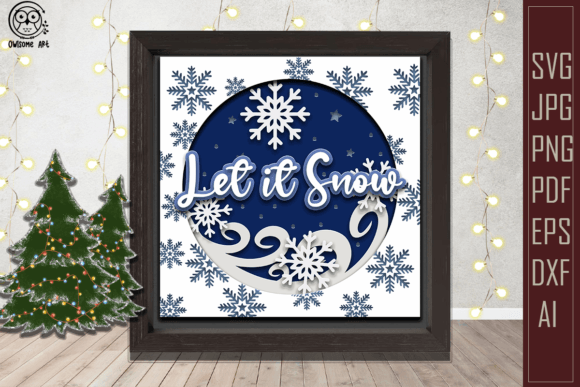
The defining feature of a 3D design is its depth, achieved through stacked layers. A common mistake among beginners is importing the file and immediately sending it to the mat without inspecting the layer panel. In a well-constructed 3D Let It Snow SVG, the layers are separated to represent different depths of the scene—perhaps the background sky, the mid-ground trees, and the foreground text. If these layers are grouped incorrectly or if the "spread layers" option hasn't been utilized in your design software, your machine might try to cut everything on a single plane, defeating the purpose of the 3D effect.
Before cutting, take the time to ungroup the elements and verify that each layer is distinct. Some files come with "stacked" layers ready for assembly, while others provide "spread" layers that require you to manually offset them to create the shadow effect. Ignoring this distinction can lead to wasted materials. A practical approach is to do a test cut on scrap paper first. Assemble the pieces to see how the shadows fall. You may find that adding a thin spacer of foam tape between specific layers enhances the visual impact more than sticking them directly together. This small adjustment transforms a flat-looking project into a dynamic piece of art.
Material Selection and Cutting Precision
Even with perfect digital files, the physical result depends heavily on your choice of materials. A frequent error is using cardstock that is either too thick or too thin for the intricacy of the design. The "Let It Snow" motif often includes delicate snowflakes and fine script text. If your paper is too heavy, the blade may drag, tearing the intricate details. Conversely, if the paper is too flimsy, the layers may warp when adhered, causing the 3D structure to collapse or look uneven.
For best results, opt for high-quality cardstock in the 65lb to 80lb range. This weight provides enough rigidity to hold the 3D shape while remaining flexible enough for detailed cuts. Additionally, pay attention to the grain direction of the paper if you are creating a large sign; aligning the grain correctly can prevent bowing over time. When assembling, avoid using wet glues like standard white school glue, as the moisture can cause the paper to buckle. Double-sided tape or adhesive dots provide a cleaner, faster bond that maintains the integrity of the layers.
Commercial Use and Licensing Clarity
For entrepreneurs and freelancers, understanding the licensing terms attached to your download is non-negotiable. Just because a file is available for instant download does not automatically grant you the right to sell physical items made from it. Many designers offer personal use licenses by default, requiring a separate commercial license for selling finished goods. Overlooking this detail can lead to serious legal and ethical issues down the road.
Always read the "Terms of Use" included in your ZIP file. If you plan to sell mugs, shirts, or wooden signs featuring the 3D Let It Snow SVG, ensure you have the appropriate permissions. Some creators allow unlimited sales of physical items but prohibit selling the digital file itself or using it for print-on-demand services where you do not handle the production. Being proactive about licensing protects your business reputation and supports the original artists who spend hours crafting these complex vectors.
Final Checks Before You Cut
Before you commit your expensive cardstock to the blade, perform a final digital audit. Check that all paths are closed; open paths can cause the machine to make unnecessary moves or fail to cut shapes completely. Ensure that any text has been welded or united if you want it to be a single solid piece, preventing individual letters from falling out during weeding. Remember, the mock-up images you see in the shop listing are for presentation purposes only and are not included in the download. You are receiving the raw design files, which gives you the creative freedom to choose your own color palette and textures.
By taking these precautions, you move beyond simply following instructions to truly mastering the craft. The 3D Let It Snow SVG is a powerful tool in your creative arsenal, capable of producing stunning results when handled with care and knowledge. Whether you are making gifts for family or inventory for your shop, the effort you put into preparation will shine through in the quality of your final creation. Happy crafting, and may your winter projects be filled with depth and joy.