Mastering 3D Rainbow Paper Cut SVG Files
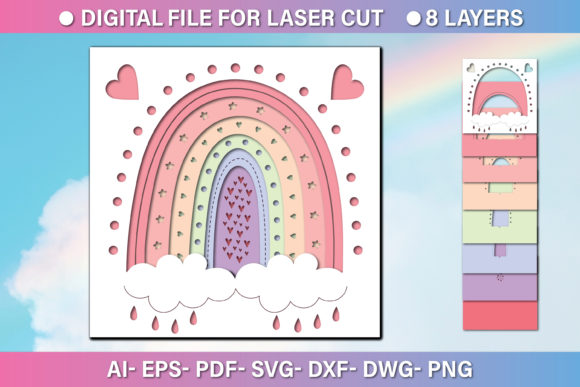
The intersection of digital design and physical craftsmanship has never been more accessible, yet finding assets that bridge the gap seamlessly remains a challenge for many creators. A 3d Rainbow Paper Cut SVG File represents more than just a colorful graphic; it is a precision-engineered blueprint designed to transform flat materials into vibrant, dimensional art. Whether you are operating a high-end laser cutter in a professional workshop or using a desktop CNC router for small business projects, the quality of your input file dictates the quality of your final output. These rainbow digital multilayer layout files are specially prepared to eliminate the guesswork often associated with layering designs, allowing you to focus on material selection and execution rather than troubleshooting vector paths.
When you acquire a comprehensive package containing formats like AI, EPS, SVG, DXF, DWG, PNG, and PDF within a single ZIP folder, you are essentially investing in workflow efficiency. The core value lies in the versatility of these files. While the base graphic might be presented at 1200 x 1200 pixels for preview purposes, the true power of vector-based formats like SVG, DXF, and DWG is their ability to be scaled infinitely without losing resolution. This scalability is critical for professionals who need to adapt a single design for various applications, from intricate greeting cards to large-scale wall installations, without needing to redraw or re-vectorize the artwork.
Streamlining Production for Laser and CNC Machines
For entrepreneurs and small business owners specializing in custom paper goods or decorative signage, time is the most valuable currency. Manually separating colors into distinct layers for a multi-colored rainbow design can take hours and often leads to alignment errors during the cutting process. The 3d Rainbow Paper Cut SVG File solves this by providing pre-separated layers that correspond directly to the color spectrum. When loaded into software compatible with laser cutters or CNC routers, these layers allow the machine to execute cuts in a specific sequence, ensuring that each tier of the "paper cut" effect aligns perfectly with the one beneath it.
This preparation significantly reduces material waste. In a production environment, a misaligned cut can ruin an entire sheet of premium cardstock or acrylic. By utilizing files that are rigorously tested for machine compatibility, operators can run batches with higher confidence. The inclusion of DXF and DWG formats specifically caters to users working with industrial-grade CAD software, ensuring that the geometric integrity of the curves and corners remains intact regardless of the machinery used. This level of compatibility supports a smoother transition from the digital concept to the physical product, strengthening communication between designers and machine operators.
Enhancing Creative Possibilities Across Industries
Beyond the technical advantages, these files open doors for diverse creative applications. Educators teaching design principles can use these multilayer layouts to demonstrate how depth and shadow work in physical media. By printing or cutting different layers on varying shades of paper, students can visualize the mechanics of 3D illusions. Similarly, marketers and event planners can leverage these designs to create eye-catching invitations or backdrop elements that stand out in a sea of flat digital prints. The tactile nature of a layered paper cut rainbow adds a perceived value to physical products that digital images simply cannot replicate.
Freelance illustrators and publishers may also find significant utility in these assets. Instead of creating complex shadows and highlights manually in illustration software, one can import the layered SVG or EPS file and manipulate individual components to fit a specific brand palette or thematic requirement. Because the files are vector-based, adjusting the hue of a specific layer or modifying the thickness of a cut line is instantaneous. This flexibility allows creators to iterate rapidly, testing different color combinations or material textures—such as vellum, cardstock, or thin wood veneers—to achieve the desired aesthetic outcome.
Technical Specifications and File Utility
Understanding the specific role of each file format in the provided ZIP folder is essential for maximizing the utility of the purchase. The SVG and EPS files are ideal for web designers and those using Adobe Illustrator, offering clean paths that are easy to edit. For those entrenched in the engineering or architectural sectors, the DXF and DWG files ensure seamless integration with AutoCAD and similar platforms, maintaining precise measurements required for mechanical fitting. Meanwhile, the PNG offers a high-resolution raster option for quick mockups or digital marketing materials where a physical cut is not immediately required, and the PDF serves as a universal standard for sharing proofs with clients who may not have specialized design software.
The infinite scalability of these vectors means that a design originally conceived for a 5x5 inch card can be expanded to a 4-foot wide display without any pixelation or loss of detail. This is particularly beneficial for businesses that need to maintain brand consistency across different scales of merchandise. However, users must remain mindful of their specific machine's capabilities. While the file can scale infinitely, the physical limitations of the cutting bed and the structural integrity of the chosen material will dictate the maximum feasible size. Thinner materials may require support bridges for large spans, a consideration that should be addressed during the setup phase in the cutting software.
Practical Considerations and Limitations
While the 3d Rainbow Paper Cut SVG File offers substantial benefits, it is important to approach its usage with a realistic understanding of material constraints. Not all papers or substrates react the same way to layering. Heavier cardstocks create more pronounced shadows and depth but may require adjustments to the laser's power settings to avoid charring edges. Conversely, lighter papers offer delicate details but may warp if adhesive is applied unevenly between layers. Users should always perform test cuts on scrap material to fine-tune their machine settings before committing to a full production run.
Additionally, the complexity of the design means that assembly time can vary. For hobbyists creating a single piece for home decor, the manual assembly of multiple layers is part of the therapeutic process. However, for high-volume manufacturers, the labor cost of assembling ten or twelve distinct layers per unit must be factored into pricing models. Automation tools for stacking exist but often require custom jigs. Therefore, evaluating whether the visual impact of the 3D effect justifies the additional assembly time is a crucial business decision.
Ultimately, the value of these rainbow digital multilayer layout files lies in their ability to serve as a robust foundation for creativity. They remove the technical barriers of file preparation, allowing professionals and enthusiasts alike to focus on the artistry of the final product. By providing a comprehensive suite of formats and ensuring infinite scalability, these assets empower users to push the boundaries of what is possible with laser cutting and CNC routing, turning simple sheets of material into dynamic, colorful experiences.