Crafting Realism: The Emerald 3D Papercraft Guide
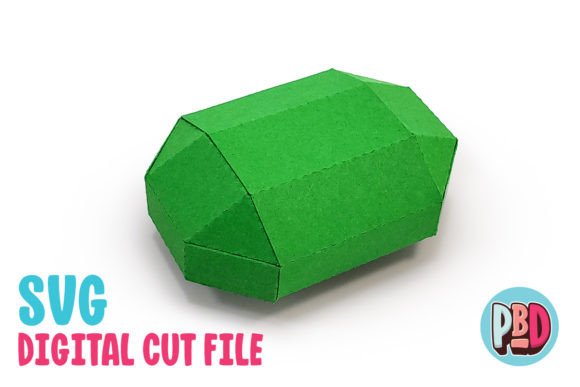
There is a distinct satisfaction in holding a physical object that you built from scratch, especially when that object mimics the brilliance of a precious gemstone. The Emerald 3D Papercraft model offers exactly this experience, bridging the gap between digital design and tangible art. Whether you are a hobbyist looking for a weekend project, an educator seeking a hands-on geometry lesson, or a party planner needing unique decor, this faceted crystal design delivers impressive results with minimal material investment. Measuring precisely 2.75 inches in length, 2 inches in depth, and 1 inch in height, it strikes a perfect balance between detail and manageability, making it suitable for display on shelves, desks, or as part of a larger installation.
At its core, this project is about precision and patience. The design relies on medium cardstock to achieve the necessary structural integrity while allowing for crisp folds that define the gem's facets. Unlike flimsy paper models that warp under their own weight, the recommended medium cardstock ensures the emerald holds its geometric shape, catching light and casting shadows just like a real stone. This attention to material quality is what separates a professional-looking finish from a crafty experiment. When assembled correctly, the interlocking tabs and scored lines create a seamless exterior that hides the mechanics of its construction, resulting in a polished, high-end appearance.
Versatile Applications Beyond the Craft Table
While the immediate appeal of the Emerald 3D Papercraft lies in its aesthetic value, its utility extends far beyond simple decoration. For event planners and party hosts, particularly those organizing pirate-themed events or treasure hunt activities, these crystals serve as exceptional props. Imagine a table centerpiece scattered with dozens of these green gems, or perhaps hidden within sandboxes for guests to discover. Because the files are digital, you can produce as many as needed without waiting for shipping or worrying about stock shortages. This scalability makes it an ideal solution for large-scale events where budget and consistency are key concerns.
In educational settings, this model serves as a powerful tool for teaching spatial reasoning and geometry. Teachers can use the assembly process to demonstrate how two-dimensional shapes transform into three-dimensional objects. Students learn about vertices, edges, and faces in a tactile way that textbooks simply cannot replicate. Furthermore, the requirement to follow specific instructions and manage small components fosters fine motor skills and attention to detail. For art classes, it introduces the concept of light and shadow through faceting, encouraging students to think about how surface angles affect visual perception.
Professionals in marketing and branding can also leverage this type of papercraft for experiential campaigns. A jewelry brand might use these models in window displays to create a lush, abundant look without the risk of displaying actual inventory. Similarly, game designers and dungeon masters can utilize them as physical tokens for tabletop role-playing games, adding a layer of immersion to their sessions. The ability to customize the color by choosing different shades of green cardstock allows for further adaptation, letting creators match specific team colors or thematic requirements effortlessly.
Technical Specifications and File Compatibility
Understanding the technical side of the Emerald 3D Papercraft download is crucial for a smooth building experience. The package typically includes a ZIP file containing SVG cut files, DXF cut files, and PDF instructions. Each format serves a specific purpose depending on your hardware and software ecosystem. For users with Silhouette machines running Designer Edition or higher, or those using Cricut Design Space, the SVG file is the superior choice. SVGs retain vector data cleanly, ensuring that cut lines and score lines remain distinct and accurate. This results in cleaner edges and easier weeding, which is vital for intricate designs with many small tabs.
However, if you are working with the basic version of Silhouette Studio, you will need to rely on the DXF file. It is important to note that DXF files behave differently and require specific configuration to load correctly. To avoid frustration, you must adjust your import settings before opening the file. Navigate to Edit Preferences, select Import, and change the DXF setting from "As-is" to "Centered." Skipping this step often leads to misaligned cuts or files that appear off-screen. Additionally, be aware that DXF files may open more slowly and sometimes lack the crispness of SVGs, so patience is required during the setup phase.
The included PDF instructions are your roadmap through the assembly process. They usually contain a full material list and step-by-step visuals. Ignoring these guides can lead to structural failures, such as gluing tabs to the wrong faces or folding mountain lines as valley lines. Taking the time to read through the instructions before cutting your first sheet of cardstock can save you both time and materials. Remember, all downloaded files must be extracted from the ZIP archive before they can be accessed by your cutting software; attempting to open them directly from the compressed folder will result in errors.
Maximizing Quality and Efficiency
To get the most out of your Emerald 3D Papercraft project, consider the environment in which you work. Good lighting is essential not just for seeing the cut lines, but for applying adhesive accurately. Using a fine-tip glue pen or a toothpick for applying adhesive to small tabs prevents excess glue from seeping out and marring the finish of the emerald. When selecting your cardstock, test a single piece first. Some brands of "medium" cardstock vary in thickness; if it is too thick, the folds may crack, and if it is too thin, the structure may collapse. Aim for a weight between 65lb and 80lb cover stock for optimal results.
Efficiency also comes from batch processing. If you are creating decor for a party, set up your cutting machine to run multiple sheets overnight. Organize your cut pieces by facet or section before beginning assembly to streamline the workflow. This methodical approach reduces the cognitive load during the gluing phase, allowing you to focus on alignment rather than searching for the next piece. For entrepreneurs selling handmade goods, this efficiency translates directly to higher profit margins, as reduced assembly time means more units produced per hour.
Ultimately, the value of this digital download lies in its flexibility. It empowers creators to produce high-quality, custom decor on demand. Whether you are enhancing a child's bedroom, designing a theatrical set, or simply enjoying the meditative process of paper engineering, the Emerald 3D Papercraft provides a reliable and rewarding platform. By respecting the technical requirements and embracing the creative possibilities, you transform simple sheets of paper into something that sparkles with intention and craftsmanship.